



SUPPORT


How do I disable DICOM function?


Once Apache Cloud has been enabled, DICOM cannot be disabled retroactively.
Is there a way to integrate DICOM and worklist?
In the app, go to Menu -> Help & About, and tap the App ver.
section three times to access the DCM logs and other relevant logs. These logs can then be provided to PACS vendors or the Apache team for further analysis.
section three times to access the DCM logs and other relevant logs. These logs can then be provided to PACS vendors or the Apache team for further analysis.
How do I print the report?
You can print the report through the in-app report system or by using a Network Shared Folder.
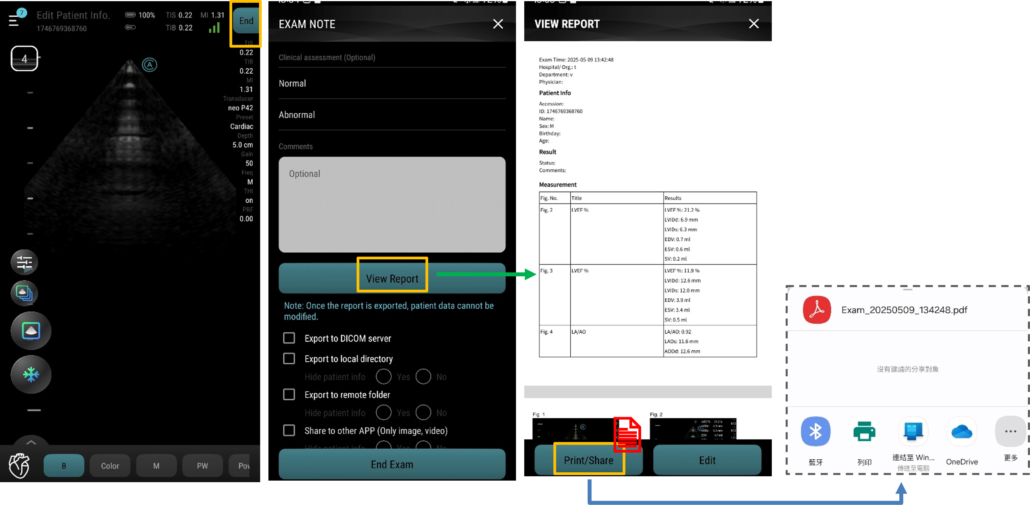
For instructions on setting up the Network Shared Folder, please refer to the guide available at “Additional Features”.
You can also follow the steps provided in our feature tutorial for detailed guidance.
Aco Classroom | Master Hands-On POCUS Scanning with Aco
Sharpen your scanning skills with concise, specialty-specific POCUS tutorials.
Feature Tutorials | Apache neo Quick Start & Feature Guide
Step-by-step guides on UI settings, image optimization, and advanced features to power your daily clinical workflow.
