





How to set up a shared-network folder?


I have already set up a shared-folder, but I still cannot export information.
Please confirm a few things as shown below:
1. Test and confirm data can be transferred via shared folder.
2. Confirm your mobile device or tablet has enabled Wi-Fi function.
3. Confirm your mobile device and share folder PC is under the same network domain.
How do I authorize DICOM function?
I have been authorized DICOM, but I still cannot transfer images?
Please confirm a few things in this step:
1. Confirm your mobile device or tablet has Wi-Fi function.
2. Confirm the data input including Ae Title, IP, Port is correct.
3. After confirming, use the Echo function to see the synchronization -> connection status of DICOM.
DICOM Echo is successful but still cannot transfer images.
What is the language ISO IR for the DICOM system connection?
You can configure these settings in Menu -> Setting -> DICOM Server Setting.
Why can't I connect to DICOM?
How do I disable DICOM function?
Is there a way to integrate DICOM and worklist?
section three times to access the DCM logs and other relevant logs. These logs can then be provided to PACS vendors or the Apache team for further analysis.
How do I print the report?
You can print the report through the in-app report system or by using a Network Shared Folder.
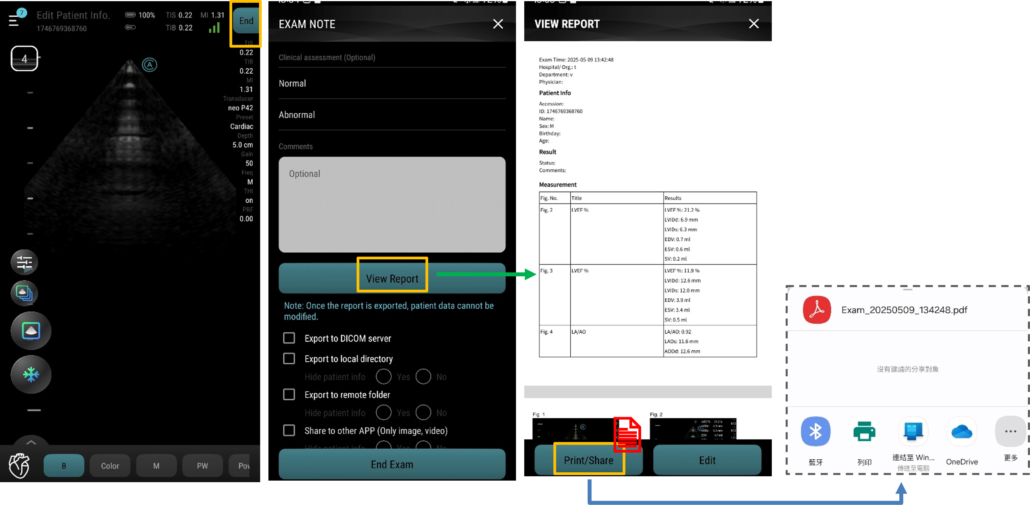
For instructions on setting up the Network Shared Folder, please refer to the guide available at “Additional Features”.
You can also follow the steps provided in our feature tutorial for detailed guidance.